
Last updated: October 2026
Is using ChatGPT to study cheating? It depends entirely on how you use it. This guide gives you a simple green-yellow-red framework for judging any AI use, shows you how to read your syllabus AI policy, and includes a copy-paste email template for asking your professor when you’re unsure.
Key takeaways
- AI use falls into three zones: green (clearly fine), yellow (check your syllabus), red (clearly cheating).
- Green-zone uses keep you doing the thinking — practice questions, fresh explanations, self-quizzing.
- Yellow-zone uses touch graded work — always check the syllabus or ask first.
- When in doubt, a 2-minute email to your professor beats an academic integrity case.
- Use AI to study more effectively, not to skip the work.
Is Using ChatGPT to Study Cheating? The Short Answer
The anxiety is real. Nobody agrees on the rules, and the last thing you want is an academic integrity hearing over a homework assignment. Here’s the reassuring part: the answer is not a flat “yes” or “no.”
The question was never really “is using ChatGPT to study cheating?” — it’s “is this particular use cheating?”
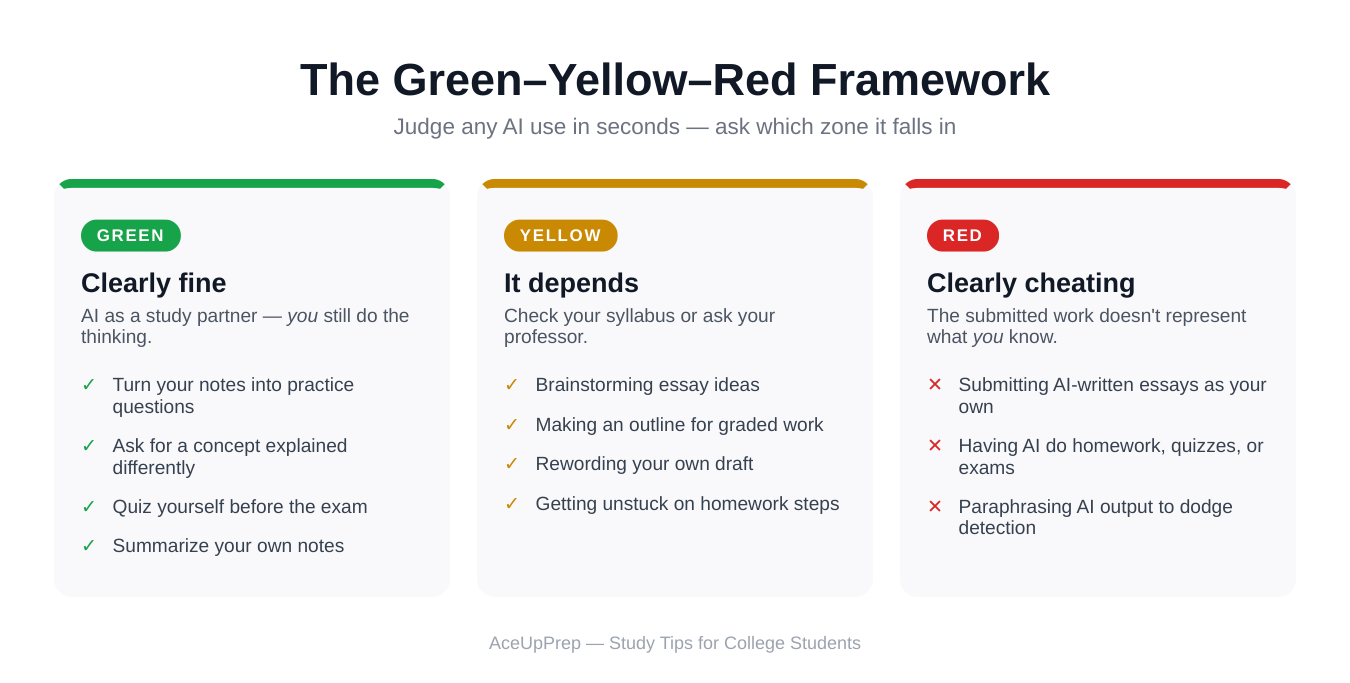
Think of AI use in three zones: green (clearly fine), yellow (depends on your syllabus), and red (clearly cheating). If you learn the framework below, you’ll be able to place almost any situation in seconds.
Green: Clearly Fine — AI as a Study Partner
Green-zone uses have one thing in common: you are still doing the thinking and the learning. ChatGPT acts like a tutor or study buddy, not a ghostwriter.
Turn your notes into practice questions
Paste in your own lecture notes and ask for quiz questions with the answers hidden. Testing yourself beats re-reading notes almost every time, and AI removes the tedious part of writing the questions.
Get unstuck on a concept
When a textbook explanation makes no sense, ask ChatGPT to explain it differently — simpler, with an analogy, or with a worked example. You’re not skipping the learning; you’re finding a path into it.
Quiz yourself before the exam
Have it drill you like flashcards: you answer, it tells you if you’re right, and it follows up on what you missed. The knowledge going into the exam is still yours. You’re just using a smarter version of a study partner.
Summarize your own notes
Upload your notes and ask for a one-page summary of the key points. The source material is yours, so condensing it isn’t dishonest — you’re spotting the big picture, not outsourcing.
Test your understanding
Try this: explain a concept to ChatGPT in your own words and ask it to point out where you’re wrong or vague. This forces you to produce the knowledge rather than just recognize it — and that production step is where real learning happens.
None of these replace studying. They are studying — just more efficient.
Yellow: It Depends — Check Your Syllabus or Ask
Yellow-zone uses aren’t automatically cheating, but they aren’t automatically fine either. When AI touches graded work — ideas, structure, wording — you need permission, not assumptions.
Brainstorming essay ideas
Using ChatGPT to brainstorm angles for a paper is a gray area. For many professors it’s like talking ideas through with a friend; for others, the ideas are part of what you’re graded on. If the syllabus limits AI to “studying, not assignments,” brainstorming for an assignment is off-limits.
Making an outline for graded work
An outline shapes your argument, and the argument is often the whole point of the assignment. Some professors are fine with AI-assisted outlining; others consider the structure part of your original work. Don’t guess — this one is almost always policy-specific.
Rewording your own draft
You wrote the draft, but the AI polished the sentences. It depends on what’s being measured: in a writing class, rewording changes the thing being graded; in a biology lab report, light editing is closer to a spellchecker. Your professor’s policy decides.
Getting unstuck on homework steps
Asking AI to show you how to approach a problem you’re stuck on is a classic yellow-zone move. If you then solve the problem yourself, many professors would call that learning. If you copy the AI’s steps into your homework, that’s red. The difference is whether your submitted work reflects your understanding.
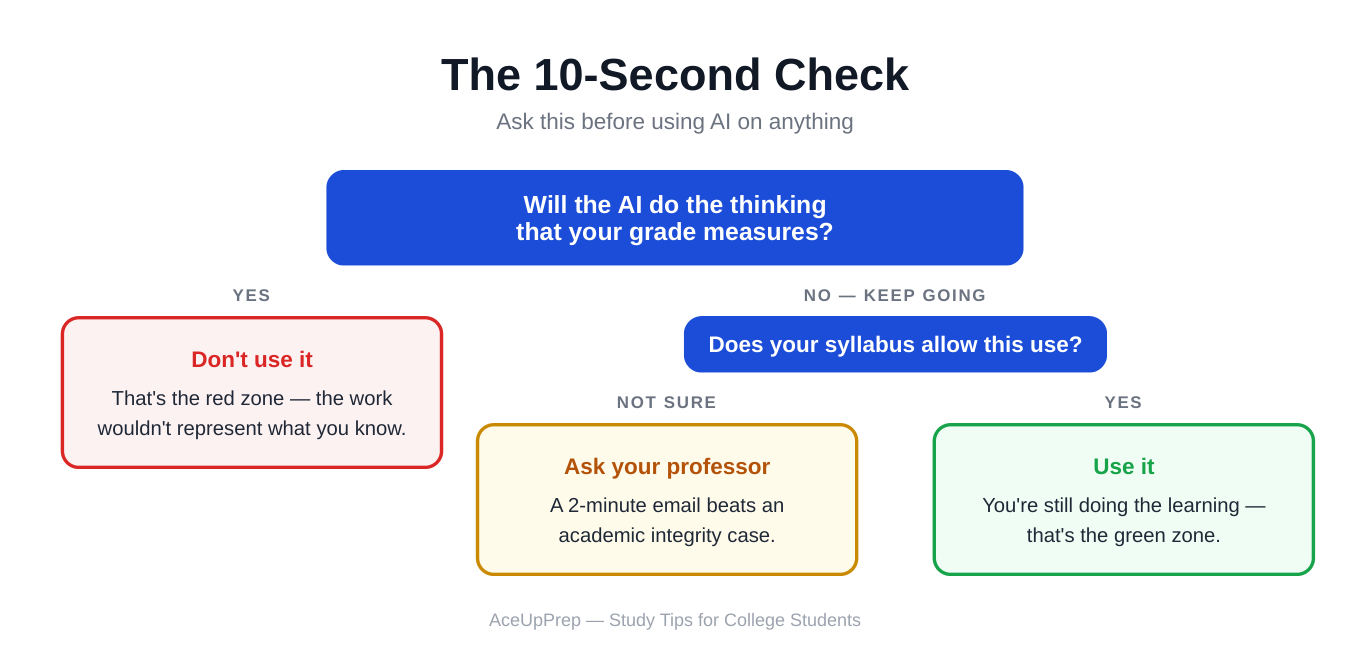
The rule for yellow: when in doubt, your syllabus and your professor answer — not the internet. A quick email takes two minutes and can save you from a violation. There’s a template for exactly that later in this article.
Red: Clearly Cheating — Don’t Go Here
Red-zone uses share one trait: the work you submit doesn’t represent what you know. It represents what the AI knows. No syllabus ambiguity saves these.
Submitting AI-written essays or answers as your own
This is the big one. Turning in an essay, discussion post, or short answer that ChatGPT wrote — even if you edited it — means claiming someone else’s work as yours. That’s plagiarism, whether the author is a person or a machine.
Having AI do your homework, quizzes, or exams
If AI completes the assignment, quiz, or exam for you, you haven’t learned the material and the grade doesn’t reflect your ability. This applies to take-home work too. “It wasn’t during class” doesn’t make it okay.
Paraphrasing AI output to dodge detection
Running AI text through a paraphraser — or manually rewording it — to avoid AI detectors doesn’t make it yours. Detection tools don’t define cheating; submitting work you didn’t produce does. Trying to hide it actually makes the situation worse if you’re caught, because now there’s intent to deceive.
A note on detectors
AI detectors are unreliable, and professors know it. You can’t use “it won’t get flagged” as your rule for what’s okay. The line isn’t what a detector says — it’s whether the work genuinely came from your brain.
How to Read Your Syllabus AI Policy
Many colleges now include AI rules in syllabi, but they’re written in academic language that’s easy to skim past. Don’t skim — here’s what to look for.
1. Which tools are named
Check whether the ban or permission covers all AI tools or just specific ones. Older policies might name ChatGPT but not newer tools — assume the intent covers all of them unless your professor says otherwise.
2. What uses are explicitly allowed
Some syllabi allow AI for brainstorming or studying but ban it for writing assignments. The allowed list is your safe zone. If a use isn’t on the allowed list and isn’t on the banned list, treat it as yellow — ask.
3. Disclosure rules
Some professors allow AI use but require you to disclose it — a sentence at the end of your paper, a footnote, or a note in your submission. Disclosure doesn’t make a banned use okay, but failing to disclose an allowed use can still count as a violation. Follow the stated format.
4. Penalties
Know what’s at stake. Penalties range from a zero on the assignment to failing the course to a formal academic integrity record. The severity tells you how seriously the professor and department take the issue — and how careful you should be.
5. Who to ask when it’s unclear
Good syllabi name a person: the professor, a TA, or the academic integrity office. That’s your lifeline for every yellow-zone question. Professors would much rather answer a quick question than file a violation — asking signals honesty, not guilt.
One more thing: AI policies change every semester. A professor who allowed AI brainstorming last fall might ban it this spring, and department policies get updated as the technology changes. Re-read the AI section of every syllabus at the start of every term, even for professors you’ve had before.
When the Policy Is Unclear, Just Ask
Seriously — ask. Students avoid this because they worry the question itself looks suspicious. It doesn’t. Professors consistently say they’d rather clarify than catch you. An email takes two minutes; an academic integrity case takes weeks.
Here’s a template. Copy it, fill in the brackets, and send it:
Subject: Quick question about AI use for [assignment name]
Hi Professor [Last Name],
I wanted to check your policy on AI tools before I start [assignment name]. Would it be okay to use ChatGPT to [specific use — e.g., “brainstorm possible thesis angles” / “check my outline” / “generate practice problems from my notes”]? I want to make sure I’m using it in a way you’re comfortable with.
Thanks,
[Your Name]
[Course name and section]
Notice what the email does: it names the specific use, not AI in general. “Can I use AI?” gets you a vague answer. “Can I use it to generate practice questions from my own notes?” gets you a precise one — and shows you’re thinking about the line, not trying to cross it.
Why the Line Actually Matters
Here’s the honest version, no lecture: college is the one time in your life when someone is paid to help you learn things, and the grade is supposed to prove you learned them. Every time AI does the thinking for you, you skip the exact struggle that builds the skill — and the credential you earn starts to outrun what you can actually do.
That gap catches up with people — in the job interview where you can’t explain the concept on a whiteboard, or the internship where there’s no chatbot to lean on. Using AI to study more effectively makes you sharper. Using it to skip the work makes the degree emptier. The line isn’t about pleasing your professor. It’s about making sure the person the diploma describes is actually you.